Through advanced filtration technology and high - quality materials, we ensure that our DPFs meet the most stringent environmental standards helping to improve air quality and protect the environment.
Through advanced filtration technology and high - quality materials, we ensure that our DPFs meet the most stringent environmental standards helping to improve air quality and protect the environment.

DPF regeneration operation example
Please note that the above data is for reference only, and the control strategy of the host ECU may vary for different vehicle models. Therefore, in practical operation, it is necessary to understand and follow the regeneration execution strategy of specific vehicle models. Next, we will demonstrate how to use the H6D Pro for DPF regeneration using the example of the GT10.
Firstly, connect the diagnostic equipment to the car and select the SAIC Maxus dedicated model G10.
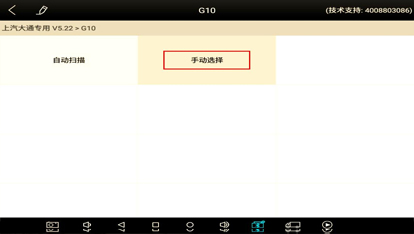
Next, we will take this model as an example to demonstrate how to perform DPF regeneration using H6D Pro.
>Using H6D Pro for DPF regeneration
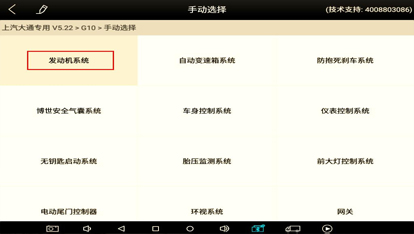
After connecting the diagnostic equipment and selecting the SAIC Maxus dedicated model G10, enter the "manual selection" stage to continue the DPF regeneration process.

>Manual selection and engine system operation
Enter the 'Engine System' option to continue with the subsequent steps.
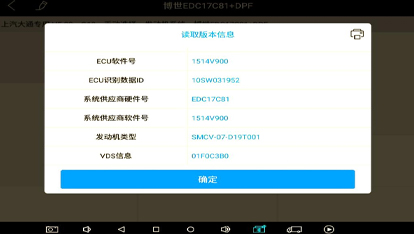
View and record the version information of the ECU, and it is recommended to save it by taking photos or screenshots.

>Data flow interface and special function operations
Enter the data flow interface and observe the changes in soot values. If the soot value exceeds 40 units, it is necessary to consider replacing the particle trap.
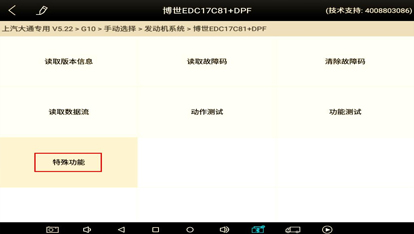
Enter the "Special Features" option to continue with subsequent operations. If your vehicle is equipped with a new particle trap, simply perform a reset operation; For the old particle catcher, a forced regeneration procedure needs to be performed.